Use Vercel AI Gateway with sanity-plugin-seofields AI
Learn how to connect Vercel AI Gateway to the seofields AI feature with a secure server-side endpoint, provider routing, and editor-safe Studio config.
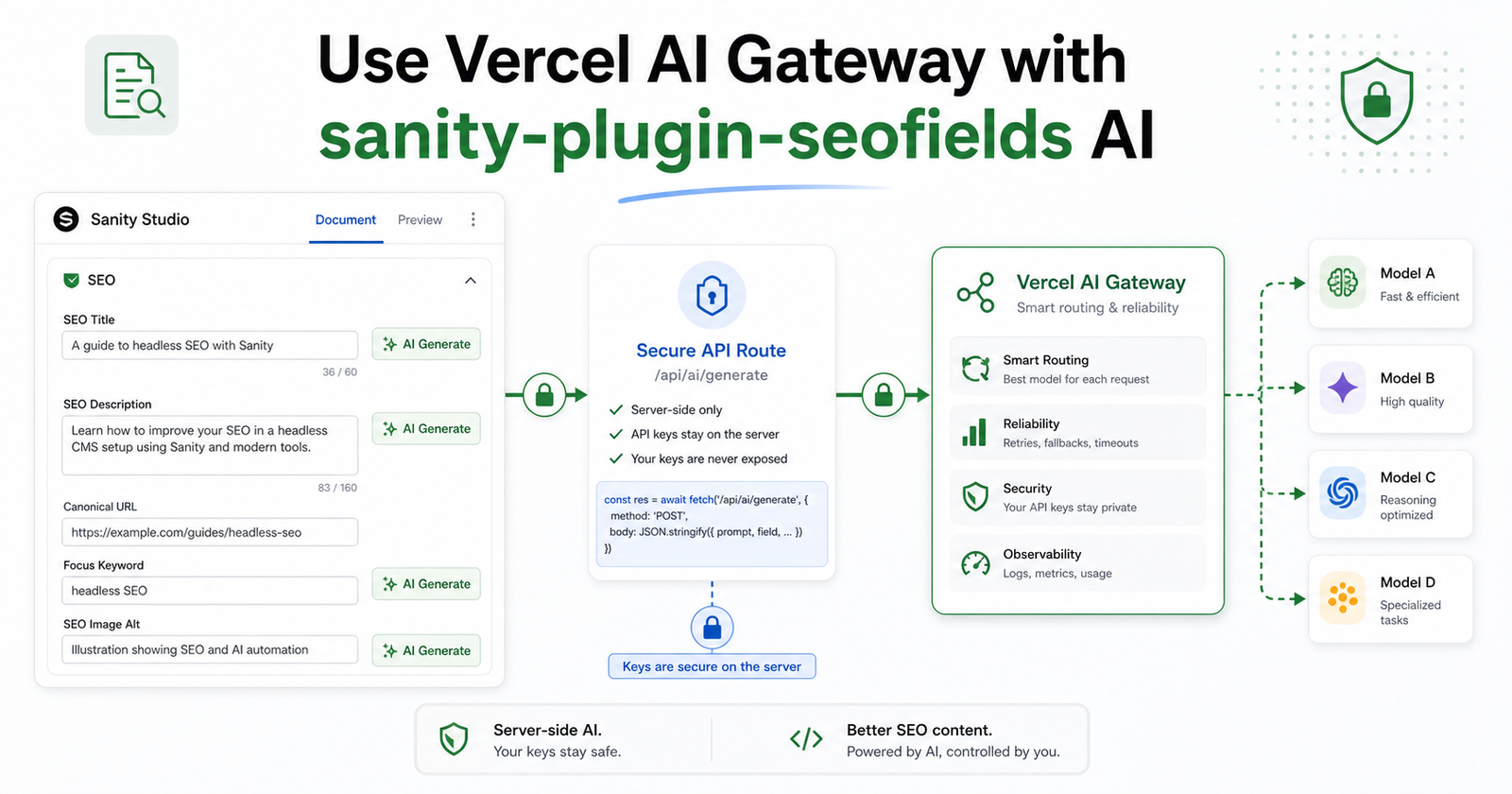
Vercel AI Gateway is a useful fit for the AI generation feature in sanity-plugin-seofields because it gives one gateway for many model providers while keeping model routing, spend visibility, and provider changes outside the Sanity Studio bundle.
The safest integration pattern is simple: configure the Studio to call your own SEO generation endpoint, then let that server endpoint call Vercel AI Gateway. Editors get AI buttons for meta titles, descriptions, keywords, Open Graph, and X Card fields. Provider keys stay server-side.
Why use Vercel AI Gateway for seofields AI?
The seofields AI feature can generate SEO titles, descriptions, focus keywords, keyword suggestions, Open Graph copy, and Twitter/X card copy. Vercel AI Gateway adds an operational layer around those calls: one API key, access to many models, usage monitoring, budget controls, and easier model switching.
- Use one gateway instead of wiring several provider SDKs into your SEO generation endpoint.
- Switch model strings such as openai/gpt-5.5 or anthropic/claude-sonnet-4.6 without changing the Studio configuration.
- Keep observability and spend management in Vercel while editors stay inside Sanity Studio.
The architecture: Studio endpoint, server adapter, AI Gateway
Do not put AI provider keys directly in sanity.config.ts for production. Sanity Studio is a browser application, so direct apiKey config can be bundled into client JavaScript. Instead, set ai.endpoint in the plugin config and implement a server route that uses sanity-plugin-seofields/server.
- An editor clicks Generate on a seofields AI-enabled field.
- The Studio posts field, content, focusKeyword, keywords, and existing meta context to your endpoint.
- The endpoint runs the seofields generation pipeline server-side and sends the model request to Vercel AI Gateway.
- The endpoint returns { result: string }, and the generated value is inserted into the Studio field.
Step 1: Configure the Studio to use a server endpoint
In the Sanity Studio config, the AI settings should point to a route you control. The Studio does not need AI_GATEWAY_API_KEY. It only needs to know where to send the SEO generation request and what editorial context to pass.
seofields({ ai: { endpoint: '/api/seo/generate', industry: 'saas', content: ['title', 'excerpt', 'body'] } })
The content option should match your document model. For blog posts, title, excerpt, and body are usually enough. For product pages, include product description, category, feature fields, pricing summary, or any copy that explains the page intent.
Step 2: Create a Next.js route handler
In a Next.js App Router project, create an API route and use the server adapter from sanity-plugin-seofields/server. Configure it as an OpenAI-compatible provider with Vercel AI Gateway as the base URL.
createNextRouteHandler({ provider: 'openai', apiKey: process.env.AI_GATEWAY_API_KEY, baseUrl: 'https://ai-gateway.vercel.sh/v1', model: 'openai/gpt-5.5', industry: 'saas' })
That keeps the same seofields prompting, validation, retry, and refinement behavior, but routes the final model call through Vercel AI Gateway. If you later prefer another model, change the model string in the server route instead of changing the Studio bundle.
Step 3: Add the server environment variable
Set AI_GATEWAY_API_KEY in the server environment where the route runs. In local development, this can live in .env.local. On Vercel, add it as an environment variable or use the authentication flow recommended by the Vercel AI Gateway docs for your deployment setup.
AI_GATEWAY_API_KEY=your_vercel_ai_gateway_key
Step 4: Choose a model and keep it easy to swap
Vercel AI Gateway model IDs include the provider prefix. For SEO copy generation, start with one reliable text model and tune temperature before adding fallback logic. The important part is that seofields only needs the final text result; the gateway can handle provider choice and routing behind the endpoint.
- Use lower temperature for meta titles and canonical SEO descriptions.
- Use slightly higher temperature for social titles and Open Graph descriptions.
- Keep model changes server-side so editors do not need to redeploy or reconfigure Studio for every experiment.
Step 5: Test with one field first
Before rolling this across every document type, test one safe field such as meta description. Confirm that the endpoint receives content, returns { result: string }, and does not expose secrets in browser network payloads. Then test the fields editors will use most: title, description, focus keyword, keyword suggestions, Open Graph title, Open Graph description, Twitter title, and Twitter description.
Production checklist
- Studio config uses ai.endpoint, not a direct browser-side apiKey.
- The server route uses AI_GATEWAY_API_KEY and the AI Gateway base URL.
- The model string is provider-prefixed and easy to change in one server-side file.
- The endpoint returns only the generated result needed by Studio.
- Vercel usage, spend, and model routing are monitored outside the editor workflow.
Where this fits in the seofields AI workflow
Use the Vercel AI Gateway overview to understand routing, model access, and spend controls. Use the Vercel AI SDK docs for current model-string and authentication behavior. Use the seofields AI integration docs for the Studio endpoint contract and server adapter examples.
The cleanest setup is not Vercel AI Gateway inside Sanity Studio. It is Sanity Studio calling a secure seofields endpoint, and that endpoint using Vercel AI Gateway on the server.